Why I Built the Vym Keyboard: Design Notes & Workflow Fixes
A personal look into why I designed a custom mechanical keyboard for Vim editing, i3wm navigation, split spacebars, and home-row efficiency.
🤖 [ AI-ASSISTED ]
If you spend your entire day inside Vim, i3wm, or a terminal, standard keyboards start feeling like they were built for a completely different job.
After years of stretching my left pinky to hit Escape, straining to hit Control combinations, and realizing standard keyboards heavily underutilize my thumbs, I decided to design my own layout from scratch.
Here is the story behind the Vym Keyboard and the design choices that made it into the final layout.
1. Putting Escape and Leader Keys Where They Belong
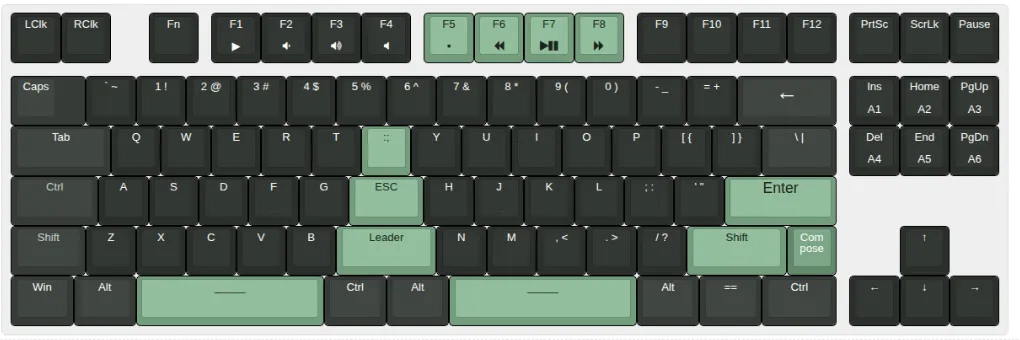
The main goal of modal editing in Vim is to keep your hands on the home row (ASDF / HJKL). Yet, the key you hit dozens of times an hour—Escape—is tucked away in the top-left corner of standard keyboards.
To fix this, I made a few layout tweaks focused on shortcut efficiency and a minimal learning curve—keeping all standard QWERTY keys in their familiar spots so you can pick it up in a day without retraining your muscle memory:
- Center Home-Row Escape: I placed Escape right in the middle of the home row between
GandH. Exiting Insert mode just takes a quick tap with my index finger without moving my wrist at all. - Relocated Caps Lock: I moved Caps Lock away from the home row up to the top left—far out of the way (may SQL developers excuse me!).
- Left-Hand Ergonomics & Wrist Alignment: Standard keyboard staggering forces an awkward left wrist angle. I adjusted the left-side key cluster so the wrist posture and hand direction naturally mirror the right hand.
- Dedicated Leader Key: I added a Leader key right below Escape to make triggering multi-key QMK shortcuts (like saving or jumping buffers) instant (by default, it is mapped to Shift).
- Shortcut-Friendly Control Keys: Centralized Control and Alt keys bring Vim and terminal shortcuts right under your thumbs—sparing Emacs users from chronic wrist displacement and gymnastics.
- Top-Bezel Mouse Clicks: Dedicated Left and Right click buttons on the top left bezel let you jump to function definitions, dismiss popups, or handle quick clicks without reaching for a mouse.
- Dedicated Compose Key: A key next to right Shift for unicode characters and system macros.
2. Fixing the Spacebar & Saving My Thumbs
Standard spacebars waste a lot of space for how big they are.
Instead of one huge bar, I split it into two separate thumb keys with a Control key in the middle. This gives both thumbs something useful to do—like switching layers or hitting shortcuts effortlessly without awkward stretching.
3. Firmware & Customization
Underneath, the board runs on QMK firmware with custom keymap definitions.
Open Source Files
I made the entire project open source—including schematic files, CAD models, and QMK firmware configs.
You can find all the design files on my GitHub:
👉 github.com/ibulgaru/keyboard
Check out the full specifications and project page on the Vym Product Page.